Style Guide
Tables
A practical guide to table styles, header options, and common combinations, illustrated with fictional data.
Default Table
figure.table
The standard table provides padded cells and a strong header treatment when a Header Row is present. Most examples below put modifier classes on the surrounding figure.table. All names, schedules, and figures on this page are fictional.
| Workshop | Duration | Recommended for |
|---|---|---|
| Content Planning | 2 hours | Teams preparing a new resource library |
| Design Basics | Half day | New editors |
| Accessibility Review | 1 day | Teams improving forms, navigation, and content |
| Analytics Essentials | 90 minutes | Marketing managers |
Table w/ Equal-width Columns
table--equal-columns
Gives every column the same width, even when the content lengths differ. Compare the short duration values with the longer recommendations. Wide content can still scroll horizontally.
| Workshop | Duration | Recommended for |
|---|---|---|
| Content Planning | 2 hours | Teams preparing a new resource library |
| Design Basics | Half day | New editors |
| Accessibility Review | 1 day | Teams improving forms, navigation, and content |
| Analytics Essentials | 90 minutes | Marketing managers |
Bordered Table
table--bordered
Adds horizontal separators beneath cells and a stronger divider beneath the header. Useful for comparing individual records; this class does not add vertical grid lines.
| Order | Item | Quantity | Status |
|---|---|---|---|
| DEMO-101 | Desk lamp | 12 | Ready |
| DEMO-102 | Notebook set | 36 | Packing |
| DEMO-103 | Standing desk | 4 | Awaiting stock |
| DEMO-104 | Cable organizer | 28 | Ready |
Striped Table (Columns)
table--striped
Applies a light background to alternating body columns, starting with the first. Follow one metric down its column to compare the fictional campaign results.
| Campaign | Visits | Inquiries | Bookings |
|---|---|---|---|
| Spring launch | 12,400 | 248 | 62 |
| Summer series | 9,800 | 196 | 49 |
| Autumn preview | 15,600 | 312 | 78 |
| Winter workshop | 7,200 | 144 | 36 |
Striped Table (Rows)
table--striped-rows
Stripes alternating body rows to help readers track across a list. This example has no figure.table wrapper: table--striped-rows is applied directly to the table element.
| Session | Room | Start | Seats |
|---|---|---|---|
| Writing for the Web | Cedar | 9:00 AM | 24 |
| Content Modeling | Maple | 10:00 AM | 18 |
| Inclusive Design | Birch | 11:00 AM | 30 |
| Search Essentials | Oak | 1:00 PM | 20 |
| Reporting Basics | Elm | 2:00 PM | 16 |
Toned Table
table--toned
Uses a soft gray background across header and body cells, with light separators and generous body-cell padding. A quieter treatment for reference information.
| Service level | Response window | Included reviews |
|---|---|---|
| Essential | 2 business days | 1 per month |
| Standard | 1 business day | 2 per month |
| Priority | 4 business hours | Weekly |
Hover Table
table--hover
Highlights the row under the pointer on wider screens. Move the pointer across the rows to compare the treatment. This is a visual cue; it does not make the rows clickable.
| Project | Lead | Phase | Target |
|---|---|---|---|
| Orchard website | Avery Lane | Discovery | March |
| Harbor resource hub | Jordan Reed | Design | April |
| Summit portal | Casey Quinn | Development | May |
| Meadow newsletter | Riley Brooks | Review | June |
Table w/ Sticky First Column
table--sticky-column
Keeps the first column visible while the other columns scroll horizontally. Narrow the window or use the scroll controls on this wide forecast. No Header Row is enabled here, so the sticky-column class can be viewed on its own. Scroll wrappers and controls are added automatically by the site.
| Location | January forecast | February forecast | March forecast | April forecast | May forecast | June forecast | Planning reference |
| North studio | 120 | 128 | 136 | 144 | 152 | 160 | DEMO_REGIONAL_FORECAST_REFERENCE_2027_120 |
| South studio | 96 | 104 | 112 | 120 | 128 | 136 | DEMO_REGIONAL_FORECAST_REFERENCE_2027_96 |
| East studio | 144 | 152 | 160 | 168 | 176 | 184 | DEMO_REGIONAL_FORECAST_REFERENCE_2027_144 |
| West studio | 108 | 116 | 124 | 132 | 140 | 148 | DEMO_REGIONAL_FORECAST_REFERENCE_2027_108 |
Icon Table
table--icons
Reserves a compact first column for an icon and removes its padding. The text beside each decorative symbol supplies its meaning. On small screens this class preserves the table-row presentation.
 | Featured session | A highlighted workshop for new editors. |
 | Completed review | A content review that has passed its final check. |
 | Scheduled update | A planned update waiting for its release date. |
Header Row
thead / th (no modifier class)
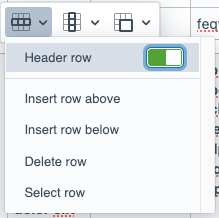
Click a cell in the editor, open the row context menu, and switch on Header row. This makes the top row column headings rather than ordinary data cells. It is a table editing option, not a CSS class.
| Membership | Monthly fee | Team seats |
|---|---|---|
| Starter | $25 | 2 |
| Studio | $75 | 8 |
| Agency | $150 | 20 |
Header Column
tbody th (no modifier class)
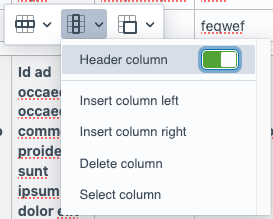
Click a cell in the editor, open the column context menu, and switch on Header column. This makes the first column row headings. It is a table editing option, not a CSS class; this example has no Header Row.
| Support window | Business hours | Extended hours | Around the clock |
|---|---|---|---|
| Response target | 2 days | 1 day | 4 hours |
| Review frequency | Monthly | Twice monthly | Weekly |
Header Column + Sticky First Column
Header column + table--sticky-column
Enable Header column in the column context menu, then add table--sticky-column.
| Location | January forecast | February forecast | March forecast | April forecast | May forecast | June forecast | Planning reference |
|---|---|---|---|---|---|---|---|
| North studio | 120 | 128 | 136 | 144 | 152 | 160 | DEMO_REGIONAL_FORECAST_REFERENCE_2027_120 |
| South studio | 96 | 104 | 112 | 120 | 128 | 136 | DEMO_REGIONAL_FORECAST_REFERENCE_2027_96 |
| East studio | 144 | 152 | 160 | 168 | 176 | 184 | DEMO_REGIONAL_FORECAST_REFERENCE_2027_144 |
| West studio | 108 | 116 | 124 | 132 | 140 | 148 | DEMO_REGIONAL_FORECAST_REFERENCE_2027_108 |
Equal-width Columns + Striped Rows
table--equal-columns table--striped-rows
Pairs balanced column widths with alternating row shading. Useful for comparing packages whose descriptions vary in length.
| Package | Content support | Review cycle |
|---|---|---|
| Starter | Copy checks | Monthly |
| Growth | Copy checks and content planning | Twice monthly |
| Complete | Planning, writing, and reporting | Weekly |
| Custom | A tailored mix of editorial support | Agreed per project |
Toned Table + Sticky First Column
table--toned table--sticky-column
Combines soft cell backgrounds with a fixed first column. The sticky cells retain the toned background while the rest of the forecast scrolls.
| Location | January forecast | February forecast | March forecast | April forecast | May forecast | June forecast | Planning reference |
|---|---|---|---|---|---|---|---|
| North studio | 120 | 128 | 136 | 144 | 152 | 160 | DEMO_REGIONAL_FORECAST_REFERENCE_2027_120 |
| South studio | 96 | 104 | 112 | 120 | 128 | 136 | DEMO_REGIONAL_FORECAST_REFERENCE_2027_96 |
| East studio | 144 | 152 | 160 | 168 | 176 | 184 | DEMO_REGIONAL_FORECAST_REFERENCE_2027_144 |
| West studio | 108 | 116 | 124 | 132 | 140 | 148 | DEMO_REGIONAL_FORECAST_REFERENCE_2027_108 |
Striped Rows + Hover
table--striped-rows table--hover
Uses alternating rows as a reading guide and adds pointer feedback on wider screens. Move the pointer across the fictional workshop schedule to see the classes work together.
| Workshop | Duration | Recommended for |
|---|---|---|
| Content Planning | 2 hours | Teams preparing a new resource library |
| Design Basics | Half day | New editors |
| Accessibility Review | 1 day | Teams improving forms, navigation, and content |
| Analytics Essentials | 90 minutes | Marketing managers |
Table on a Dark Background
bg-dark
This contextual class belongs on the surrounding layout, not on the table. It gives tables a light surface and readable body text when used inside a dark section.
| Milestone | Owner | Status |
|---|---|---|
| Kickoff | Avery Lane | Complete |
| Prototype | Jordan Reed | In review |
| Release | Casey Quinn | Scheduled |